Archived board. This is a read-only archive of the Fast Tracks forums, active 2004–2016. Posting closed in May 2016; the board was preserved as a static site in 2026. Some images were lost before archiving and are marked where they appeared.

Fast Tracks

Model Railroading Discussion Forums

Return To The Fast Tracks Website

The Fast Tracks discussion forums have been closed. Click Here for more information.

It is currently Thu Aug 06, 2026 12:00 am

All times are UTC - 5 hours [ DST ]


Forum locked This topic is locked, you cannot edit posts or make further replies.  [ 12 posts ] 
Author Message
 Post subject: New to handlaying
PostPosted: Mon Dec 19, 2005 7:42 pm 
Offline

Joined: Mon Nov 21, 2005 9:28 pm
Posts: 7
Hi guys!

Just got my fixture today :mrgreen:

Can't wait to get working on my 1st turnout :D

Martin


Top
 Profile  
 
 Post subject:
PostPosted: Wed Dec 21, 2005 3:17 pm 
Offline

Joined: Mon May 24, 2004 6:02 pm
Posts: 63
Location: vestal, ny
sounds great martin :)
good luck on the attempt:)
and post pics ;)


Top
 Profile  
 
 Post subject:
PostPosted: Wed Dec 21, 2005 4:44 pm 
Offline

Joined: Mon Nov 21, 2005 9:28 pm
Posts: 7
i need help scaling the size of the picture down - it's too large for posting :?


Top
 Profile  
 
 Post subject:
PostPosted: Thu Dec 22, 2005 11:56 am 
Offline

Joined: Mon May 24, 2004 6:02 pm
Posts: 63
Location: vestal, ny
martin,
do you have photoshop?
would be easy with that.
under image, there is resize, just check to make sure the image size is locked (so that the ratio of the image doesnt change)
or you could also do it with ms-paint (part of windows)
under image...there is "stretch/skew", where you can change the image by percent (e.g. enter 50% for 1/2 size)
also, make sure you enter equal values for both stretch and skew, so that the image ratio remains the same.


Top
 Profile  
 
 Post subject:
PostPosted: Thu Dec 22, 2005 12:47 pm 
Offline

Joined: Mon Nov 21, 2005 9:28 pm
Posts: 7
ok, got image reduced in size, now i can't add it to my post :?:


Top
 Profile  
 
 Post subject:
PostPosted: Thu Dec 22, 2005 10:10 pm 
Offline
Site Admin

Joined: Fri Mar 26, 2004 1:26 am
Posts: 196
Location: Brantford, Ontario, Canada
Martin,

To post an image just click the Post Reply button at the bottom of these messages, enter a message, and then click the Add an Attachment button. Browse to your file, add a file comment and click Submit.

_________________
Cheers!

Ron Warris
Fast Tracks


Top
 Profile  
 
 Post subject:
PostPosted: Fri Dec 23, 2005 8:13 am 
Offline

Joined: Mon Nov 21, 2005 9:28 pm
Posts: 7
i get an error saying:
Upload Error: Could not upload Attachment to ./files/dsc0089125_355.jpg.


Top
 Profile  
 
 Post subject:
PostPosted: Fri Dec 23, 2005 11:06 am 
Offline
Site Admin

Joined: Fri Mar 26, 2004 1:26 am
Posts: 196
Location: Brantford, Ontario, Canada
Hello Martin,

Sorry about that! We moved to a new server last week, and I forgot to reset the permissions to upload files here. It is fixed and will work now.

_________________
Cheers!

Ron Warris
Fast Tracks


Top
 Profile  
 
 Post subject:
PostPosted: Fri Dec 23, 2005 11:50 am 
Offline

Joined: Mon Nov 21, 2005 9:28 pm
Posts: 7
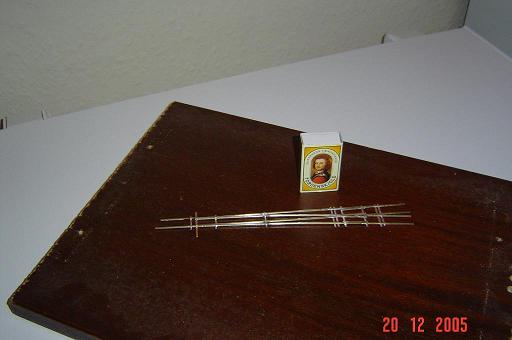
ok, here's what it looks like
only the last few solder joints were good, took me some time to work out HOW to do it :oops:


Attachments:
File comment: turnout!
DSC0089125.JPG
DSC0089125.JPG [ 21.73 KiB | Viewed 17837 times ]
Top
 Profile  
 
 Post subject:
PostPosted: Sun Dec 25, 2005 12:56 am 
Offline

Joined: Mon May 24, 2004 6:02 pm
Posts: 63
Location: vestal, ny
martin,
great work! :)
guess you'll be an old pro at in no time ;)
got any close up shots?


Top
 Profile  
 
 Post subject:
PostPosted: Sun Jan 01, 2006 12:11 pm 
Offline
Site Admin

Joined: Fri Mar 26, 2004 1:26 am
Posts: 196
Location: Brantford, Ontario, Canada
Hello Martin,

Looks good! If you have a scanner you can actually scan your finished trackwork. Works much better than a camera and is really easy to get a nice closeup.

_________________
Cheers!

Ron Warris
Fast Tracks


Top
 Profile  
 
 Post subject:
PostPosted: Sun Jan 01, 2006 6:26 pm 
Offline

Joined: Mon Nov 21, 2005 9:28 pm
Posts: 7
thanks for the scanner tip - not pretty to look at tho :oops:

i will scan next turnout if it is less awful to look at :wink:


Top
 Profile  
 
Display posts from previous:  Sort by  
Forum locked This topic is locked, you cannot edit posts or make further replies.  [ 12 posts ] 

All times are UTC - 5 hours [ DST ]


Who is online

Users browsing this forum: No registered users and 1 guest


You cannot post new topics in this forum
You cannot reply to topics in this forum
You cannot edit your posts in this forum
You cannot delete your posts in this forum
You cannot post attachments in this forum

Search for:
cron
Powered by phpBB® Forum Software © phpBB Group