Archived board. This is a read-only archive of the Fast Tracks forums, active 2004–2016. Posting closed in May 2016; the board was preserved as a static site in 2026. Some images were lost before archiving and are marked where they appeared.

Fast Tracks

Model Railroading Discussion Forums

Return To The Fast Tracks Website

The Fast Tracks discussion forums have been closed. Click Here for more information.

It is currently Thu Aug 06, 2026 12:00 am

All times are UTC - 5 hours [ DST ]


Forum locked This topic is locked, you cannot edit posts or make further replies.  [ 6 posts ] 
Author Message
 Post subject: 'slush' in the frog
PostPosted: Thu Jan 10, 2008 12:10 pm 
Offline

Joined: Thu Mar 08, 2007 2:51 pm
Posts: 10
Good morning. I've been working away replacing all my old hand laid turnouts with new ones made using Fast Tracks. Progress is good, and extremely rewarding. Well worth the effort!

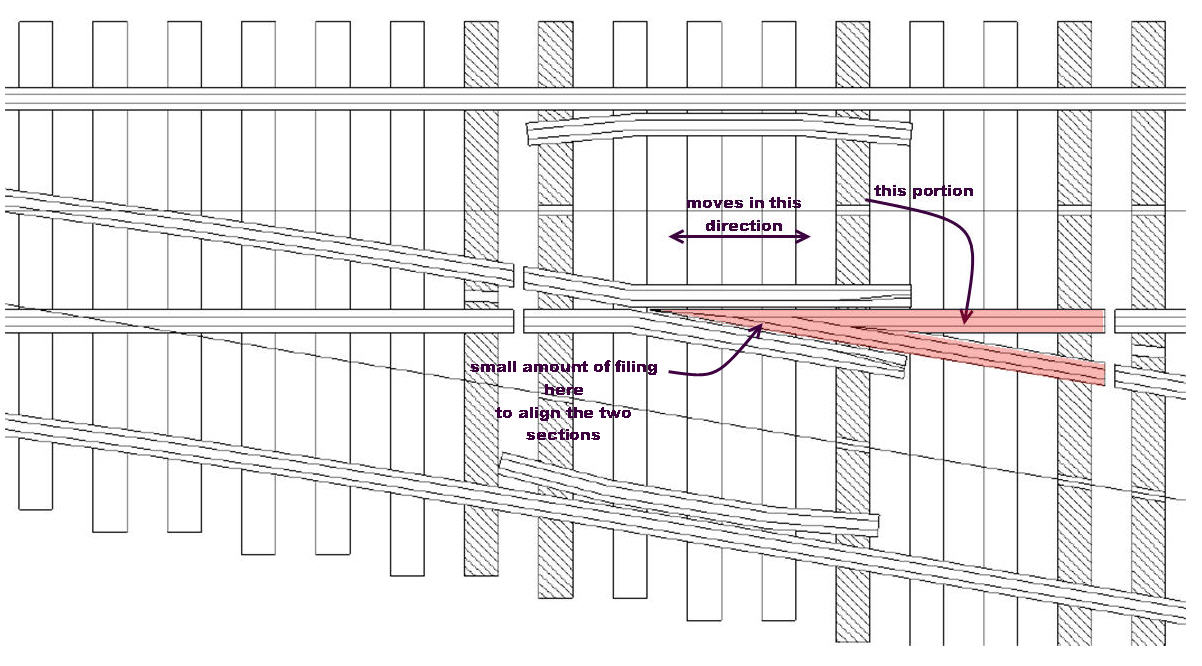
I have noticed one condition that occurs on occasion. When I initially make a frog in the Fast Tracks jig, they are secure and fit nicely within the jig. However, after I take them out to work on the rest of the turnout components, then go to reinsert the frog into the jig, I notice a bit of horizontal movement-maybe 1/64 or 1/32 of an inch- in the direction of the point portion of the turnout. This doesn't occur always, and usually I can file to fit after installation. Am I forcing the two pieces of rail that form the frog together too much? Not enought?
Anyone have any thoughts or advice on this?

Thanks,
Stephen


Top
 Profile  
 
 Post subject:
PostPosted: Mon Jan 14, 2008 4:09 pm 
Offline

Joined: Wed Jan 03, 2007 1:18 pm
Posts: 84
When you mention you can file to make the rails fit, what do you file?

Do both rails move forward or just one?

_________________
"Life is about learning"


Top
 Profile  
 
 Post subject:
PostPosted: Mon Jan 14, 2008 6:26 pm 
Offline

Joined: Thu Mar 08, 2007 2:51 pm
Posts: 10
First, both rails move. If there is a hitch, I can file the diverging rail's outside surface just a bit to get it to line up with the other rail-see sk.
I did a couple more turnouts this weekend, this time using code 83 vs code 70, and I found by sliding the 'movable ' piece all the way towards the point portion of the turnout, it worked fine without needing to file anything. Is this confusing?

Stephen


Attachments:
frog.jpg
frog.jpg [ 148.67 KiB | Viewed 9377 times ]
Top
 Profile  
 
 Post subject:
PostPosted: Mon Jan 14, 2008 7:01 pm 
Offline
User avatar

Joined: Sat Aug 13, 2005 10:48 am
Posts: 365
Location: East Texas - USA
I see now. You are building prototypical asymmetric frog point rails vs. the the equal angled symmetrical ones. The point filing blocks from Fast Tracks are setup for the symmetrical assembly. (Though the double slip filing blocks have an extra positioning for the oblique center frog that works well for doing the asymmetrical styles). Likely the code 83 gave just enough extra 'heft' in the profile to allow your filing to make a cleaner fit.

P. S. Prototype would have the main route be the solid point rail.

When filing the asymmetric diverging route, you have to also (JUST) file along the base of the main route point back a bit further so the diverging point nestles up and fits to the main point. You also have to use a different angle block to make the filing. I use #4 for #8 turnouts, #5 for #10 - etc. Have to 'hand' file the #5, #6, #7 and #9 turnouts after first filing with the #4 or #5 filing block. After a few times, it becomes second nature.

Once you fit and solder though, seldom can you actually see the difference in a joint. I'm not sure one gains a lot, though with very light soldering the joint does show (and gives the prototypical cosmetic).

_________________
-ed mccamey-
COSLAR RR - http://www.coslar.us/
NMRA Standards and Conformance Department
PROTO & FINE Scale Coordinator
I estimate I have about 5 pounds of coupler springs somewhere in the vicinity of my workbench.


Top
 Profile  
 
 Post subject:
PostPosted: Tue Jan 15, 2008 6:06 pm 
Offline

Joined: Wed Dec 05, 2007 12:45 pm
Posts: 16
hh660 (!empty($user->lang['WROTE'])) ? $user->lang['WROTE'] : ucwords(strtolower(str_replace('_', ' ', 'WROTE'))):
First, both rails move. If there is a hitch, I can file the diverging rail's outside surface just a bit to get it to line up with the other rail-see sk.
I did a couple more turnouts this weekend, this time using code 83 vs code 70, and I found by sliding the 'movable ' piece all the way towards the point portion of the turnout, it worked fine without needing to file anything. Is this confusing?


Stephen,

I've recently started adding another PCB tie just to the left of where the frog gaps are cut. On your diagram it would be the tie to the left of where your "pink" frog ends. I then cut the isolating gaps between the two ties. This does two things. It anchors the frog points better and it also means that the rail extending away to the right has two connection points instead of the one called for by the jig. I'd found this rail to be rather fragile. Also, this has helped to keep my frogs down. YMMV

Robert


Top
 Profile  
 
 Post subject:
PostPosted: Wed Jan 16, 2008 11:24 am 
Offline

Joined: Thu Mar 08, 2007 2:51 pm
Posts: 10
Thanks for the replies. Robert, I lke the idea of adding an additional PCB tie, I'll try that for sure.
Ed, I used Fast Tracks drawing, I make them the way Fast Tracks suggests. I was too lazy to draw the turnout myself.
The portion that can move is the 'pink' assembly-prior to attaching it to the PCB ties,of course. From a physical standpoint, that pink wedge shouln't be able to slide in the Fast Tracks jig. It does, though. The only thing I can think of is that the soldered connection with code 70 rail is a bit too flexible. Maybe I should add more solder behind the apex, filling in the gap a bit more.
In any event, I find that when I'm ready to attach the pink portion to the PCB ties, by sliding it all the way to the left (in the case of my sk) as far it will go, things work quite well. I'll have to look closer at what 'gives' when I move the suspect part.
Again, thanks for all your comments and replies.

Stephen


Top
 Profile  
 
Display posts from previous:  Sort by  
Forum locked This topic is locked, you cannot edit posts or make further replies.  [ 6 posts ] 

All times are UTC - 5 hours [ DST ]


Who is online

Users browsing this forum: No registered users and 1 guest


You cannot post new topics in this forum
You cannot reply to topics in this forum
You cannot edit your posts in this forum
You cannot delete your posts in this forum
You cannot post attachments in this forum

Search for:
cron
Powered by phpBB® Forum Software © phpBB Group